Google Shopping and Remarketing Ads for Singapore Online Stores: Setup, Product Feed and Budget
How Singapore online stores set up Google Shopping and remarketing ads: Merchant Center, what the product feed needs, Shopping vs Performance Max, PDPA consent and budgeting by ROAS.


Google Shopping ads are built from your product feed, not from keywords. You upload your catalogue to Google Merchant Center, link it to Google Ads and pay per click when a shopper taps a product. Remarketing then shows ads to people who have already visited your store. In Singapore, the feed needs GST-inclusive SGD prices. Remarketing cookies need visitor consent under the PDPA. Set the budget from your break-even ROAS.
Shopping is unforgiving about data. A missing product identifier, a price that differs from the one on the product page or a blurry image can get a product disapproved. Disapproved products don't show, whatever the budget. This guide works through the set-up in the order the problems tend to appear: account, feed, campaign type, remarketing, consent, then money.
It sits alongside our guide to what Google Ads costs in Singapore, which covers the auction, daily budgets and GST on your ad invoices. Read that one for those mechanics, because they're not repeated here. Every Google, PDPC and IRAS source below was opened on 23 November 2026.
What are Google Shopping ads and remarketing ads?
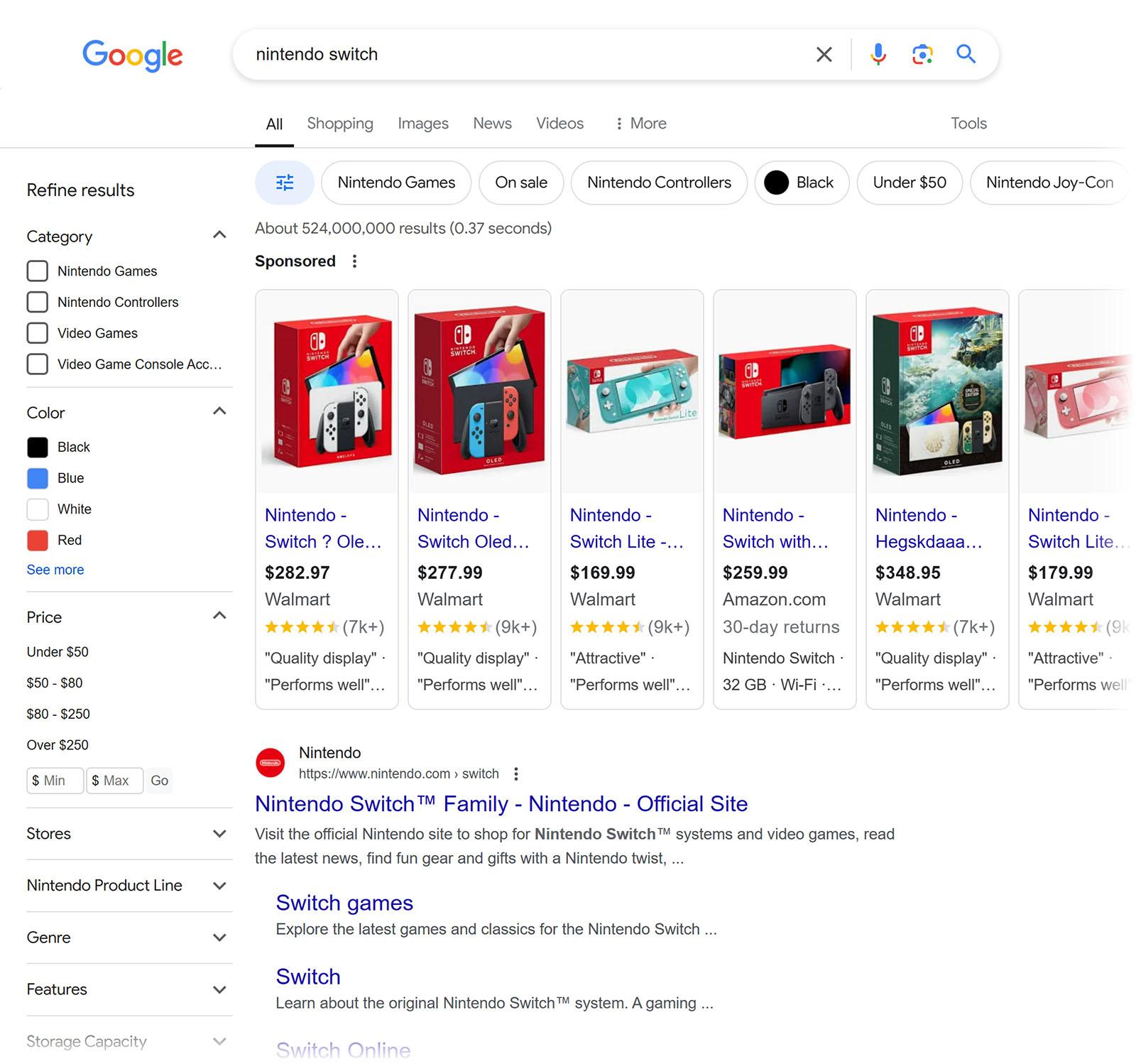
Shopping ads are product listings with a photo, title, price and store name that appear in Google Search, the Shopping tab and Google Images. Google decides when to show them by matching the search against the product data you've submitted. In its About Shopping ads page, Google says Shopping ads use "your existing Merchant Center product data (not keywords)".
Remarketing shows ads to people who have already interacted with your business. Google Ads now calls it "your data". The old term is still the one most people search for, so this guide uses both. For an online store, the useful version is dynamic remarketing. It shows a returning shopper the products they looked at.
There are five main ways to put products and past visitors to work in Google Ads:
Option | What it does | What it needs |
|---|---|---|
Standard Shopping campaign | Product ads on Search, the Shopping tab, Google Images and, optionally, search partners | Merchant Center feed linked to Google Ads |
Performance Max with a feed | Product ads plus Search text, Display, YouTube, Gmail, Demand Gen and Maps from one campaign | Feed, plus images, text and ideally video in asset groups |
Dynamic remarketing (Display or Performance Max) | Shows past visitors the products they viewed | Feed, plus a Google tag that sends product IDs |
Your data segments on Search and Shopping | Bids differently, or only, for past visitors when they search again | Google tag on the site and a big enough segment |
Customer Match | Reaches or excludes people on your own customer list | Policy-compliant account; full targeting needs spend history |
Can Singapore online stores run Google Shopping ads?
Yes. Singapore is a supported Shopping country, with Singapore dollars as the supported currency. Google's supported languages and currencies table also marks Singapore as a market where shoppers see the Shopping tab. English and Chinese are both supported feed languages. Your landing pages need to be in the same language as the feed.
Since late October, those ads can also reach Google's AI Mode here. On 28 October 2026 Google said it was scaling ads in AI Mode to ten more countries, Singapore among them. Its help page on ads in AI-powered Search experiences says existing Search, Shopping and Performance Max campaigns are eligible automatically, with no new campaign or separate budget. The same page advises merchants to keep feeds "complete and fresh", with descriptive titles, accurate prices and clear shipping and return policies.
One set-up detail catches people out. According to Google's Merchant Center getting-started page, the country you pick under business address can't be changed later. A Singapore company selling to Singapore shoppers should pick Singapore. If you also ship to Malaysia, target it from the same account rather than setting up the account under the wrong country.
How do you set up Google Shopping ads, step by step?
Setting up Google Shopping takes eight steps: create a Merchant Center account, verify your website, add business details, set shipping and returns, load your products, fix the errors, link Google Ads and track sales before you launch a campaign. In that order:
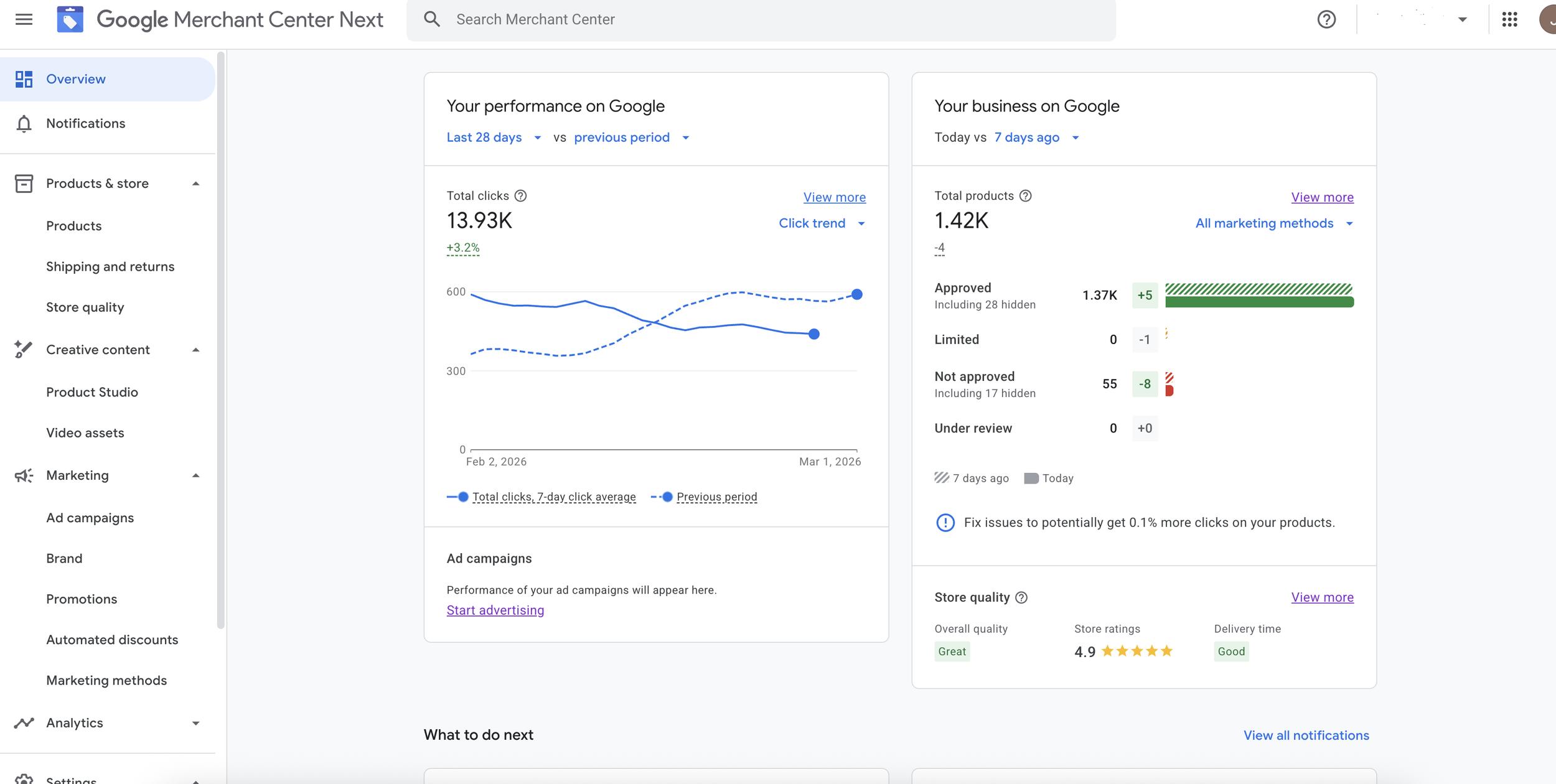
- Create a Merchant Center account. It's free. Each Google Account email can create only one Merchant Center account, so use a company address that will outlive any one employee or agency.
- Verify and claim your online store. Google offers several verification methods: your e-commerce platform, email, an HTML tag or file, Google Tag Manager or Google Analytics. If your site is already verified in Search Console, Merchant Center recognises it. A URL can be claimed by only one account.
- Fill in business information. Store name, address, customer service contact and checkout options. Keep them consistent with the contact and policy pages on your website.
- Set shipping and returns. Singapore isn't on Google's list of countries where shipping costs are mandatory, but that's not a reason to skip them. Shoppers compare delivery charges, and Google's AI Mode guidance asks for clear shipping and return policies.
- Add your products. Shopify stores can link their Shopify account so products sync automatically. Other platforms usually have a Google integration or a scheduled feed file. Small catalogues can use a Google Sheet. A scheduled file or platform sync beats a one-off upload, because prices and stock change.
- Clear the diagnostics. Merchant Center lists disapproved products and the reason for each. Fix these before you spend a dollar.
- Link Google Ads and set up conversion tracking. Track purchases with a value, not just a "thank you" page view. Shopping bidding is only as good as the revenue data behind it.
- Create the campaign. Google's Shopping campaign walkthrough notes that once a campaign is created, you can't change the Merchant Center account linked to it.
Platform syncs make step 5 look easy. They don't clean your data, though. A sync copies whatever is in your store into Merchant Center, including vague titles, missing barcodes and sale prices that ended last week.
What does your product feed need to get approved?
Every product needs, at minimum, an ID, title, description, product page link, main image link, availability and price. Most new branded products also need a brand and either a GTIN or an MPN. Google's product data specification sets the rules. These are the ones that matter most for a Singapore store:
Attribute | Rule | Singapore note |
|---|---|---|
id | Unique per product variant and stable over time | Keep IDs the same when you replatform, or you lose the product's history |
title | Plain text, maximum 150 characters | Lead with what shoppers type: brand, product type, key variant (size, colour) |
description | Maximum 5,000 characters | Same language as the title and landing page |
link | The product page URL | URL changes during a redesign break feed links too |
image_link | Accurate product image; no promotional text, watermarks or borders | Google will enforce a minimum of 500 x 500 pixels from 31 January 2027 |
price | Amount and currency must match the landing page and checkout | Submit in SGD, GST included |
availability | in_stock, out_of_stock, preorder or backorder | Sync it; overselling on a promotion day gets noticed |
brand, gtin, mpn | GTIN strongly recommended where the manufacturer assigned one | Don't guess a GTIN. Google disapproves a product with an incorrect one |
The price rules deserve a second read. Google's price attribute page says outside the US and Canada, the price you submit should include GST and match the landing page. It also bans "View price in cart" and changing the price based on the visitor's location. Singapore law points the same way. IRAS requires GST-registered businesses to show GST-inclusive prices on websites and in advertisements, with fines of up to $5,000. A store showing "$100 + GST" on its product pages has a compliance problem before it has a feed problem.
The image deadline is a quiet one. Google has announced the 500 x 500 pixel minimum for all product images and will start enforcing it on 31 January 2027. Stores with old supplier images or small marketplace-style thumbnails should audit them now, ahead of Chinese New Year promotions. AI-generated product images must also keep the metadata that marks them as AI-made.
The fixes that move performance are usually unglamorous: titles rewritten to match how people search, real barcodes added, variant data cleaned up and sale prices given end dates.
Should you use Standard Shopping or Performance Max?
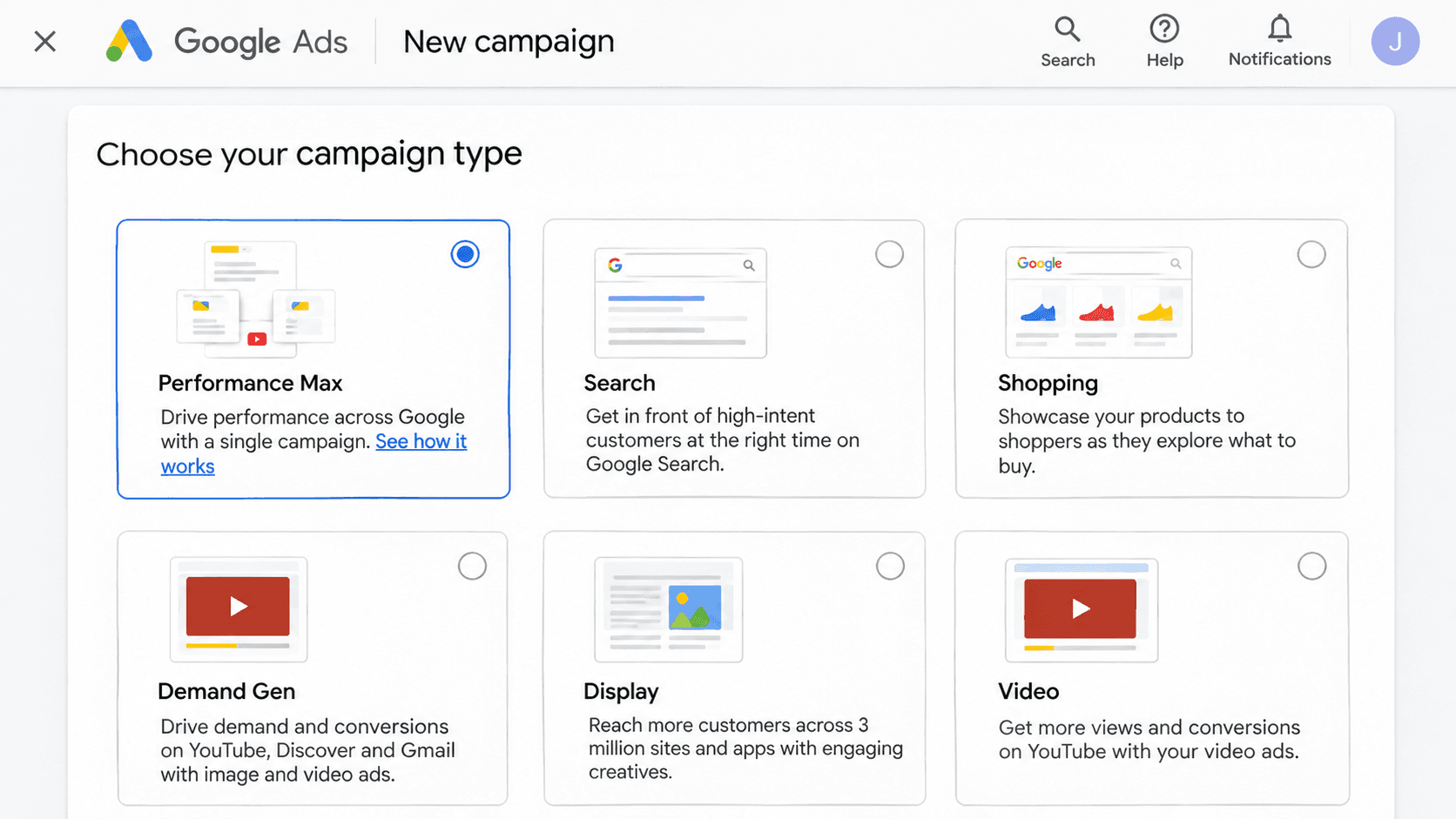
Use Standard Shopping when you want to see and control where product ads run. Use Performance Max when you have reliable purchase tracking, enough conversions for automated bidding to learn from and the images or video to fill Google's other channels. Google's comparison table sets out the differences:
| Standard Shopping | Performance Max with a feed |
|---|---|---|
Where ads show | Shopping tab, Search results, Google Images, search partners (optional) | All of those plus Search text ads, Display, YouTube, Gmail, Demand Gen, Maps |
Bidding | Target ROAS, Maximize clicks, Maximize conversion value, or Manual CPC | Maximize conversion value (optional ROAS target) or Maximize conversions (optional CPA target) |
Audiences | Can target or observe audiences, including your data segments | Audiences are signals only; Google may serve to anyone likely to convert |
Creative | Built from the feed | Feed plus your text, image and video assets |
Who it suits | New accounts, tight budgets, stores that want query-level control | Stores with clean conversion data and creative assets |
A new store with little sales history learns more from Standard Shopping. Manual CPC or Maximize clicks lets it see which products and searches earn money before handing control to automation. Performance Max can do well once conversion data exists, but it also runs remarketing and prospecting across Display and YouTube from the same budget. That makes it harder to see what is working.
Two settings on the Standard Shopping campaign page are worth knowing about. Campaign priority decides which campaign's budget pays when the same product appears in more than one. The customer acquisition option lets you bid only for new customers. Stores with a physical shop should also check inventory filters. Google's help page says local inventory ads would run by default in Shopping campaigns, with August 2026 given as the date to review the settings.
How does remarketing work for an online store?
Remarketing works by adding visitors to a list when the Google tag fires on your site, then letting you show ads to that list, or bid differently for it, for a set number of days. For a store, the strongest version is dynamic remarketing, which pulls the exact products a visitor viewed from your Merchant Center feed into the ad.
Google's dynamic remarketing guide says retailers use their Merchant Center feed for this, with a tag that records which products each visitor saw. The recommended retail events are view_item_list, view_item, add_to_cart and purchase. Each one sends product IDs, and those IDs must match the id values in your feed. If your site reports one ID and your feed uses another, the ads have nothing to show.
The numbers that decide whether a list is usable come from Google's page on how your data segments work:
- A segment needs at least 100 active users in the past 30 days to serve on Display, Search or YouTube.
- Membership lasts 30 days by default and up to 540 days. Google suggests matching it to your sales cycle.
- New lists can take 48 to 72 hours to fill.
For a small Singapore store, 100 active users can take a while on a narrow list such as "added to cart in the last 7 days". Start with broader lists, such as all product viewers over 30 days, and split them once traffic allows.
Customer Match, which uses your own email list, comes with access tiers. Under Google's Customer Match policy, any policy-compliant account can use customer lists for observation and exclusions. Targeting a list directly needs 90 days of Google Ads history and more than USD 50,000 in lifetime spend. Many smaller stores therefore use Customer Match for exclusions, such as leaving out people who bought last week, before they can use it for targeting. You can only upload data you collected first-hand, and your privacy policy must say you share customer data with third parties that provide services on your behalf.
Some stores can't use remarketing at all. Google's personalised advertising policy bars advertiser-built audiences, including your data segments and Customer Match, for sensitive interest categories such as health, alcohol, birth control and gambling. A Singapore store selling supplements, wine or sexual wellness products should check this before building a remarketing plan around it.
What does the PDPA mean for remarketing in Singapore?
Remarketing that collects personal data through cookies needs the visitor's consent under the PDPA. The PDPC's Advisory Guidelines on the PDPA for Selected Topics say so in paragraph 7.14. As good practice, the PDPC suggests letting visitors switch cookies for personalised advertising on or off within your website.
In practice, that means a cookie banner with a real choice, plus Google's consent mode to pass that choice to your Google tags. Consent mode doesn't provide the banner. It reads the choice from your banner and adjusts how Google Ads and Analytics tags behave. There are two versions:
- Basic: Google tags don't load until the visitor responds to the banner. Nothing is sent to Google if they decline.
- Advanced: tags load straight away with consent set to denied by default. They send cookieless pings until the visitor agrees, which gives Google more to model conversions from.
Which version suits your store is a legal and commercial call, not a technical one. Whichever you choose, write the privacy policy to match what the tags actually do. Expect your remarketing lists to be smaller than your Analytics visitor count. Google only adds people it can match, and visitors who decline drop out.
How much should a Singapore online store budget for Shopping and remarketing?
Start from your break-even ROAS, not from a monthly figure. Break-even ROAS is 1 divided by your gross margin. At a 40% margin it is 250%: every dollar of ads must bring in S$2.50 of sales just to cover product costs. Set your daily budget so you can afford enough clicks to test that within a few weeks.
A worked example, with figures chosen for illustration only:
Step | Figure |
|---|---|
Product price on site (GST-inclusive) | S$109 |
Revenue after GST | S$100 |
Gross margin | 40%, so S$40 per sale |
Most you can spend on ads per sale and break even | S$40 |
Break-even ROAS on revenue after GST | 250% |
Break-even ROAS if your purchase tag reports the S$109 GST-inclusive value | about 273% |
That last row is the Singapore wrinkle. If your conversion tag sends GST-inclusive order values, Google Ads reports a ROAS about 9% higher than the money you keep. Either send values without GST or set your targets higher to allow for it. Shipping fees in the order value inflate ROAS in the same way.
Automation needs a minimum amount of data to work. Google's Target ROAS page requires at least 15 conversions in the past 30 days for Search and Shopping campaigns. Until you reach that, Manual CPC or Maximize clicks on a small set of best-selling, high-margin products is a cheaper way to learn. Google renamed "Maximize conversion value with a Target ROAS" to "Target ROAS" from June 2026, so older guides may use either label.
Remarketing usually needs less money than Shopping, because the audience is limited to people who already visited. A store with a few thousand monthly visitors can't spend much on remarketing however high it sets the budget. Put most of the starting budget behind Shopping, which brings in the visitors, and cap remarketing at what the lists can absorb.
For how daily budgets, overspend limits and GST on Google's invoices work, see the Google Ads cost guide.
What should you check in the first 30 days?
Check Merchant Center before Google Ads. Most early problems sit in the feed, and no bid change will fix them. A sensible first-month routine:
- Merchant Center diagnostics, weekly. Disapprovals, price mismatches and missing identifiers. Fix the causes in your store, not just the feed.
- Search terms, weekly. Shopping has no keywords, so negative keywords are your main control over irrelevant searches. Queries from AI Overviews and AI Mode appear in the same search terms report.
- Product-level results. Find the products that take clicks but never sell. Exclude them or split them into their own product group with a lower bid.
- Price competitiveness. If a product's price is well above other sellers', better bids won't make it sell.
- Remarketing list sizes. Confirm lists are filling and that the product IDs in your tag match the feed.
- Consent rates. A sharp drop in tracked conversions after a banner change usually means a tagging problem, not a sales problem.
If clicks arrive but sales don't, the problem may be on the site rather than in the campaign. Our article on why websites get traffic but no enquiries covers the page-side causes. If you're about to rebuild the store, the website migration checklist applies to feed URLs as well as rankings.
Frequently asked questions
Are Google's free product listings really free?
Yes. Merchant Center accounts are opted in to free listings by default, and eligible products can appear across Google at no cost. Paid Shopping ads give more visibility and control. The same feed powers both, which is also why it matters for AI Overviews.
Do Shopping ads appear in Google AI Mode in Singapore?
Yes. Google scaled ads in AI Mode to Singapore in its 28 October 2026 expansion. Existing Shopping and Performance Max campaigns are eligible automatically, without a separate campaign or budget.
Can I upload my customer email list for remarketing?
Yes, through Customer Match, if you collected the data yourself and your privacy policy discloses the sharing. All compliant accounts can use lists for observation and exclusions. Direct targeting needs 90 days of history and over USD 50,000 in lifetime spend.
Do I need a cookie banner for Google remarketing in Singapore?
If your remarketing cookies collect personal data, yes. The PDPC's guidelines say targeting ads through cookies that collect personal data needs consent, and recommend letting visitors set ad cookie preferences on your site.
Should my feed prices include GST?
Yes, if you are GST-registered and selling to Singapore shoppers. Google requires the feed price to match the landing page and checkout, and IRAS requires GST-inclusive prices on websites and advertisements.
Fix the feed first, then set the bids
Before you raise a bid, open Merchant Center and check how many products are approved. Then check that the purchase tag reports the order value you expect. A campaign built on a broken feed or a broken tag only spends money faster.
Plexial sets up and manages Shopping, Performance Max and remarketing campaigns for Singapore online stores, including Merchant Center feeds and consent-aware tracking. See how our Google Ads management works, or get in touch for a feed and account review. If your customers also research products in AI assistants, our guide to advertising on ChatGPT in Singapore covers the newest paid channel, and our SEO team works on the organic side of the same product pages.
Written by
Jae Tan
Jae shares insights on technology, digital innovation, and business trends, helping businesses navigate change and uncover new opportunities.