Redesigning Your Website Without Losing Google Rankings: An SEO Migration Checklist
A practical SEO migration checklist for Singapore SMEs: URL maps, permanent redirects, Search Console checks and lessons from a real site relaunch.


You can redesign or rebuild a website without wiping out Google rankings if you map every important old URL to its closest new page, ship permanent server-side redirects, remove staging noindex blocks at launch, submit an updated sitemap, and monitor Search Console until the new URLs settle. Temporary ranking wobble is normal; mass homepage redirects and forgotten noindex tags are not.
This checklist is for Singapore SMEs planning a redesign, a CMS rebuild or a host move on the same domain, and it notes when Google's Change of Address tool actually applies. It follows Google Search Central's site-move guidance and draws on what Plexial changed when plexial.io moved from WordPress to Vercel in October 2026.
What is an SEO website migration?
An SEO website migration is any redesign, rebuild or hosting change that risks changing how Google finds, indexes and ranks your pages — especially when URLs change.
Google splits the work into two cases. If users still see the same URLs and you only change hosts or a CDN, follow the hosting-change guide. If paths, the domain or HTTP to HTTPS change, follow the URL-change site-move guide. Most Singapore SME "redesigns" mix both: a new template plus cleaner slugs, merged service pages and a modern host.
That is different from choosing an AI website builder to generate a first site. If you are weighing builders rather than moving an existing property, read our separate guide on whether AI can build a professional website. This article assumes you already have URLs that earn impressions, links or enquiries and need to keep that equity intact.
Will a website redesign hurt my Google rankings?
A redesign can temporarily unsettle rankings while Google recrawls, but permanent losses usually come from broken redirects, lost content, leftover noindex rules or mapping every old URL to the homepage — not from a new look alone.
Google is explicit that significant site changes can cause ranking fluctuation while its systems recrawl and reindex, and that for medium-sized sites it can take a few weeks or more before new URLs largely replace old ones. It also states that permanent redirects (HTTP 301 and 308) do not cause a loss of PageRank. The risk sits in the implementation: redirect chains, soft-404-style dumps to an irrelevant homepage, staging noindex left on production, or new pages that no longer answer the query the old page ranked for.
Competitor articles often stress commercial continuity — keeping the demand a page used to capture, not only the rank position. That framing is useful. The operational answer for an SME is still a checklist: inventory, map, redirect once, unblock crawling, submit the sitemap, then watch Search Console.
What should you do before you redesign?
Before anyone touches design files, export your URL inventory, benchmark Search Console and analytics, and decide which pages keep their job.
- Export every live URL. Start with your XML sitemap, your CMS page list, top landing pages in analytics and the pages Search Console shows under Links. Include PDFs or image URLs that get search traffic if your site hosts them.
- Capture on-page baselines. For the pages that earn clicks or backlinks, note the title, H1, meta description and whether the page is indexed. You do not have to freeze copy forever, but you should know what you are changing on launch day.
- Benchmark demand. In Search Console, save 28 to 90 days of clicks, impressions, top queries and top pages. In analytics, note conversion events on those landing pages. Without a baseline, a post-launch dip is guesswork.
- Protect quiet but valuable URLs. A low-traffic page can still hold branded mentions, local intent or referral links. Retire it only after you know where that demand should go.
- Agree merges and retirements in writing. Folding five thin pages into one stronger guide can help. Folding five distinct intents into one vague brochure page usually does not. Never plan to send every retired URL to the homepage by default.
Hand this inventory to whoever builds the new site. A redesign without a URL map is a design project with an SEO bill attached later.
How do you build a 301 redirect map?
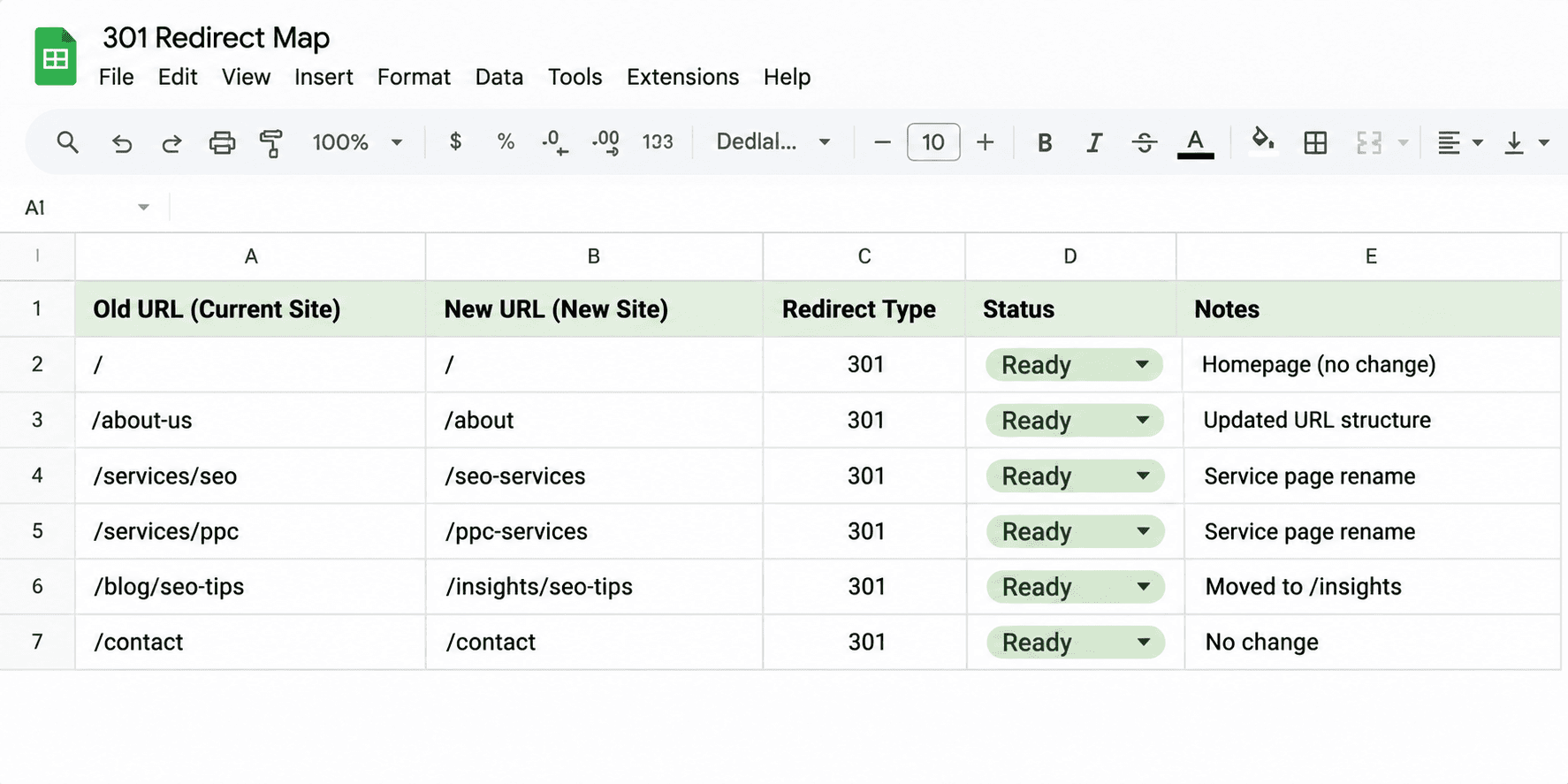
Build a one-row-per-old-URL spreadsheet that sends each important path to its closest equivalent new page with a single permanent redirect, not a chain and not a blanket homepage dump.
Google recommends server-side permanent redirects where possible. Both 301 and 308 count as permanent signals that the new URL should become canonical. Prefer one hop from old URL to final URL. Googlebot can follow chains, but Google advises keeping them short and ideally redirecting straight to the destination. Avoid sending many unrelated old URLs to one irrelevant page such as the homepage; the site-move documentation warns that pattern can confuse users and may be treated like a soft 404.
A practical map looks like this:
Old URL | New URL | Why |
|---|---|---|
/about-us | /about-plexial | Same intent, new slug |
/search-engine-optimisation | /seo-agency-singapore | Service page successor |
/old-blog-post-on-topic | /insights/relevant-article | Closest living guide |
/retired-service | /closest-service or 404/410 | Only if no honest match |
When Plexial relaunched plexial.io from WordPress to Vercel in October 2026, the launch work included 26 single-hop permanent redirects from legacy paths (for example `/about-us` to `/about-plexial` and `/search-engine-optimisation` to `/seo-agency-singapore`). Live checks on 6 November 2026 returned HTTP 308 responses, which Google treats as permanent redirects alongside 301. That map is an illustration of one-hop matching, not a promise about traffic recovery.
What do you check on launch day?
On launch day, turn on the redirects, strip staging noindex and robots blocks, confirm canonicals point at the new URLs, submit the new sitemap, and spot-check key old URLs with a live fetch.
- Switch on the redirect map at the server, edge or host config so old URLs resolve in one permanent hop.
- Remove staging blocks. Delete noindex robots meta rules and any Disallow rules that existed only to hide the preview site. A leftover noindex is still one of the fastest ways to make a polished redesign disappear from Google.
- Fix canonicals. New pages should self-canonicalise to their new URLs, not to old WordPress permalinks or a preview host.
- Test redirects. For a small site, test every row. For a larger site, test every high-click and high-link URL, then sample the rest. Search Console's URL Inspection tool and a simple HTTP check both work.
- Submit the new XML sitemap in Search Console. Google's move guide also allows keeping the old URLs' sitemap submitted briefly so crawlers rediscover redirects; remove it once the new URLs are being processed. Plexial's production sitemap lives at https://plexial.io/sitemap.xml.
- Use Change of Address only when the domain or subdomain changes. The Change of Address tool is for moves such as example.com to example.net. Skip it for same-domain path redesigns, www and non-www swaps handled with redirects and canonicals, and hosting-only moves with no URL change.
- Update internal links to the new URLs so users and crawlers are not forced through redirects forever.
- Tell Bing if you use IndexNow. Plexial verified IndexNow pinging Bing on each production deploy around 10 October 2026. That speeds discovery on Bing; it is not a Google ranking lever.
Preview hosts and open directory listings are classic launch hazards. Treat noindex on preview and a locked-down staging host as mandatory controls.
How should you monitor rankings after a website migration?
Watch Search Console for crawl errors, indexed URL shifts, and whether clicks move from old paths to new ones — judge success over weeks, not overnight.
In Search Console, compare the Page indexing (or Index coverage) view on old versus new URLs, check the Sitemaps report for submitted and indexed counts, and use the Performance report to see impressions and clicks shifting onto the new paths. Our guide to reading Search Console when traffic does not turn into enquiries covers the Performance report in more detail. If a third-party rank tracker shows a sudden cliff in the first fortnight, compare the same query in Search Console before you rewrite the site again; tracker noise and real migration lag are easy to confuse (see poisoned SERPs and Search Console checks).
Google asks for patience: it needs to crawl old and new URLs before it treats the move as complete, and speed depends on site size and server response. Keep permanent redirects in place for as long as possible, generally at least a year. If you filed Change of Address, Google's help documentation describes related notifications lasting about 180 days and advises maintaining redirects for at least that long, longer if Google Search still hits the old URLs.
What did Plexial change in its own October 2026 relaunch?
When Plexial moved plexial.io from WordPress to Vercel in October 2026, the SEO work centred on a single-hop redirect map, a clean production sitemap and Search Console continuity — not on promising instant rank gains.
The facts we can state publicly are narrow on purpose. plexial.io became the primary domain on Vercel. Twenty-six legacy paths received single-hop permanent redirects to their closest new pages. IndexNow was verified pinging Bing on production deploys around 10 October 2026. The XML sitemap is public at https://plexial.io/sitemap.xml, and Search Console is connected for the domain property. Preview noindex and an open preview file listing were treated as launch concerns; we are not inventing a tidy after-action scorecard here.
We are also not tying homepage case figures to this relaunch. Those stats describe client work shown on the homepage; they are not migration KPIs for plexial.io itself.
If you are redesigning a Singapore site and want a second pair of eyes on the redirect map before go-live, send us the old and new URL lists. We handle the SEO side through our SEO services; About Plexial also covers website design and development, though a dedicated web-design service page is not live yet.
Frequently asked questions
Do 301 redirects lose PageRank?
No. Google's site-move documentation states that 301 and other permanent redirects do not cause a loss in PageRank. Prefer a single permanent hop to the final URL.
How long should redirects stay up?
Google generally recommends keeping them for at least a year so signals and external links can transfer. If you used Change of Address, maintain redirects for at least 180 days and longer while Google Search still requests the old URLs.
When should I use the Change of Address tool?
Only when you move from one domain or subdomain to another. Do not use it for a same-domain redesign, a hosting-only move with unchanged URLs, or a simple www to non-www switch handled with redirects and canonicals.
Should every old URL redirect to the homepage?
No. Google warns against sending many old URLs to one irrelevant destination such as the homepage, because that can behave like a soft 404. Map each important URL to the closest equivalent page, or return a proper 404 or 410 when nothing honest remains.
Is a hosting-only move different from a redesign with new URLs?
Yes. If the URLs users see do not change, follow Google's hosting-change guide: prepare the new infrastructure, update DNS, monitor old and new hosts, then shut down the old host once traffic has moved. You still need to remove staging crawl blocks and confirm Googlebot can reach the new servers.
Can an AI website builder handle migration SEO for me?
Not by itself. A builder may produce templates and copy; it does not replace a URL inventory, a redirect map or Search Console monitoring. Use the builder article for procurement questions, and this checklist when an existing site's URLs must survive the rebuild.
Written by
Jae Tan
Jae shares insights on technology, digital innovation, and business trends, helping businesses navigate change and uncover new opportunities.